
to Ship
Introduction
- Shipping a package should be simple, but it often becomes difficult for people who don’t have a printer at home. That’s where the USPS label broker comes in. The USPS label broker service allows anyone to ship or return packages without printing a shipping label themselves.
- In today’s world, more people shop online, return items, and ship goods from home. But not everyone has access to a printer. Many people live in small apartments, student housing, or workplaces where printers are not fast or reliable. Some people simply don’t want to spend money on printer ink. USPS saw this problem and created a modern, free solution that helps millions of customers every year.
- This guide covers everything you need to know—including how it works, where to find it, how to get your QR code, how USPS scans it, which stores accept it, common issues, business uses, and expert tips for faster shipping. By the end, you’ll know exactly how to use this helpful service like a pro.
What Is USPS Label Broker?
- The USPS Label Broker program is a free tool that lets customers ship packages even if they don’t have access to a printer.
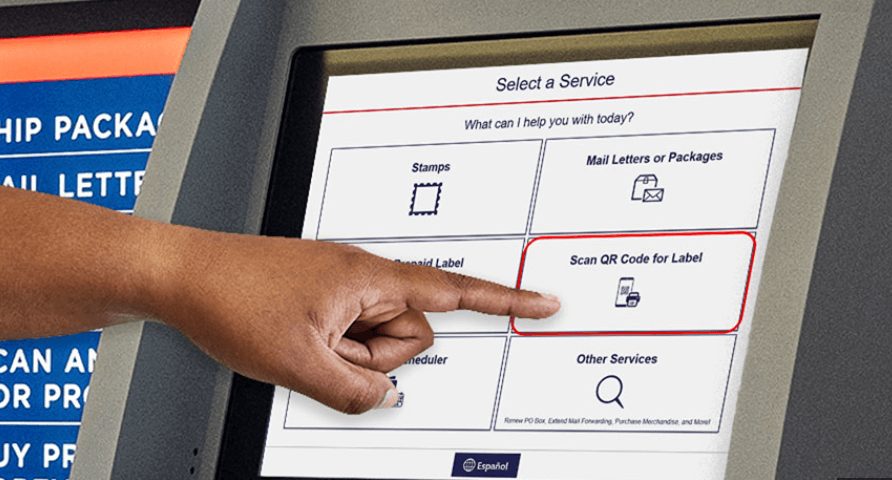
- Instead of printing a shipping label at home, you get a digital QR code. USPS scans this QR code at the counter, prints your shipping label, and attaches it to your package. You don’t pay extra. You don’t need ink or paper. You don’t need special equipment. It’s fast, simple, and designed to help anyone who wants to ship easily.
This service is available at:
- USPS retail counters
- USPS self-service kiosks that support Label Broker
- USPS partner locations, such as some grocery store counters
- Locations inside certain USPS-approved postal units
The process is safe, secure, and supported nationwide.
How the USPS Label Broker System Works
To understand the service, here’s a breakdown of the full process. It’s easier than most people think.
1. You Get a QR Code Instead of a Label
When you create a shipping label on a website—whether USPS.com, an online store like Amazon, a marketplace like eBay, or a return portal—the system gives you two options:
Download the label
Or get a Label Broker QR code
The QR code is the key. You don’t need anything else.
2. Bring the QR Code to a USPS Location
You simply walk into any participating USPS location and show them the QR code. You can display it on your phone, screenshot it, or print the QR code on paper if you prefer.
3. USPS Scans the QR Code
A postal worker scans your QR code. This pulls up your shipping label inside the USPS system instantly.
4. USPS Prints the Official Label for You
They print your label on USPS equipment, at no cost. This is the same official shipping label that you would get if you printed it at home.
5. The Label Is Attached, and Your Package Is Ready
USPS attaches the label to your package, and you’re done.
It’s a very smooth process that takes less than two minutes at the counter.
Who Can Use USPS Label Broker?
Almost everyone in the United States can use this service, including:
- Online shoppers returning items
- Small business owners
- Students
- People without printers
- Travelers staying in temporary housing
- People who don’t want to waste money on ink
- Sellers on eBay, Poshmark, Mercari, Depop, Etsy, or Facebook Marketplace
- Families shipping seasonal packages
- Anyone sending gifts or personal items
This service is not for large bulk shipments from major corporations. It’s meant for everyday customers and small to medium-sized shippers.
Benefits of Using USPS Label Broker
This is one of the most useful free tools offered by the postal service. Here are the biggest advantages:
1. No Printer Needed
The largest benefit is simple: you don’t need a printer. All you need is your phone.
2. Free Service—No Extra Fees
USPS does not charge for printing your label. You only pay the shipping cost that you would normally pay.
3. Great for Online Returns
Many companies include a Label Broker QR code in their return emails. This makes returning items extremely easy.
4. Reduces Mistakes
Printed labels at home can get smudged, torn, or unreadable. The USPS-printed label is clean and accurate every time.
5. Works for Many Shipping Types
You can use Label Broker for:
- Priority Mail
- Priority Mail Flat Rate
- First-Class Package
- Ground Advantage
- Returns
- Business shipping labels
- Marketplace shipping labels
6. Convenient for People on the Go
If you travel, stay in hotels, or move around a lot, this service saves you from hunting down a printer.
7. Helps Businesses Serve Customers Better
Online sellers can send easy QR-code returns to customers, lowering frustration and boosting satisfaction.
How to Create a USPS Label Broker QR Code
Creating the QR code takes less than one minute. Here’s the easiest method:
Step 1: Go to USPS.com
Visit the “Click-N-Ship” section on USPS.com.
Step 2: Create a Shipping Label
Enter your package details:
- From address
- To address
- Weight
- Dimensions
- Package type
Then select a shipping service.
Step 3: Choose “Label Broker” Instead of “Print Label”
Before finalizing your label, choose:
“Use Label Broker (mobile QR code).”
Step 4: Receive Your QR Code
USPS will send the QR code to your email. You can also see it on your USPS.com account under “Label Broker.”
Step 5: Show the QR Code at USPS
Take your phone to USPS, show the QR code, and you’re done.
Retailers and Marketplaces That Support USPS Label Broker
Many major companies support Label Broker for returns. Here are some common examples:
- Amazon
- Walmart
- Target
- Shein
- Nike
- Best Buy
- eBay
- Etsy
- Poshmark
- Mercari
- Chewy
- Old Navy
- Gap
- Kohl’s
- Zappos
- Macy’s
- Apple
- HP
- Samsung
- Fashion Nova
Most companies that provide a USPS return label also offer a QR code option.
Where You Can Use the USPS Label Broker Service
1. USPS Post Offices
Most USPS retail counters support Label Broker scanning and printing.
2. USPS Self-Service Kiosks (Some Locations)
Some blue kiosks support QR codes. If yours does, the scanner area will say “Label Broker available here.”
3. USPS Partner Locations
Some grocery stores and shipping centers inside supermarkets support it.
4. Village Post Offices (VPOs)
Some VPOs that operate in rural areas also support Label Broker.
If you’re not sure whether your nearest location supports Label Broker, simply ask at the counter.
How to Use USPS Label Broker for Returns
Using this for returns is easy and fast. Here’s what you do:
Step 1: Open the retailer’s return email
Look for the QR code section.
Step 2: Bring your package to USPS
Put the item in a box or poly mailer.
Step 3: Show your QR code to the postal clerk
They scan it and print your label.
Step 4: USPS attaches the label
Your return is now officially accepted.
You don’t have to print, tape, or cut anything.
Why the USPS Label Broker Matters in Today’s Shipping World
- The usps label broker is important because the way Americans ship packages has changed. More people work from home. More people shop online. More items are being returned now than ever before in history. Printer ownership has dropped, and ink has become more expensive than ever.
- Customers want convenience. Businesses want smoother return processes. USPS created a system that supports both sides.
- The tool builds trust between customers and retailers. Customers feel more confident buying online when returning items is easy. Businesses benefit because customers are more likely to shop again when the return process feels smooth.
Why USPS Created This Service
USPS built this system to solve real problems:
Printers are expensive
Ink cartridges often cost more than the printer itself.
Many people rely only on phones
The modern customer uses mobile devices more than desktop computers.
Return rates are rising
Online shopping returns have increased massively in the last few years.
USPS needed a more modern shipping method
A digital QR code system fits perfectly with modern customer habits.
This reduces customer frustration
People who didn’t have a printer often gave up on shipping items. Now they don’t have to.
How Businesses Can Use USPS Label Broker
If you own a small business, this tool can make your shipping easier. Here’s how:
You Can Offer Easy Customer Returns
Your customers can use QR-code returns with no printer needed.
You Can Create Shipping Labels on Your Phone
You don’t need to print anything at your office.
This Saves Time and Money
You won’t buy printer ink or spend time fixing paper jams.
Great for Home-Based Sellers
If you sell on marketplaces like eBay, Etsy, or Mercari, this service saves a huge amount of time.
Boost Customer Satisfaction
If customers know you offer easy returns, they are more likely to buy from you again.
Tips to Get the Most From USPS Label Broker
Here are some expert tips that many people don’t know:
1. Screenshot your QR code
This prevents issues if you lose internet connection inside the post office.
2. Use a strong envelope or poly mailer
It keeps your package safe during processing.
3. Keep your package unsealed if USPS needs to inspect the contents
Some return programs require inspection before sealing.
4. Arrive early during busy seasons
December lines can be long, so morning hours are best.
5. Always keep your receipt
It proves when USPS accepted your package.
How USPS Label Broker Makes Shipping Easier
- The USPS label broker system removes the biggest barrier customers face: printing labels. This creates a more inclusive, flexible, and modern postal experience. Every person—from a student in a dorm room to a seller in a small apartment—can ship packages without special equipment.
- This service brings USPS in line with modern online shopping culture. People want easy, fast, mobile-friendly solutions. The Label Broker tool delivers exactly that.
Common Issues and How to Fix Them
Sometimes customers run into small problems. Here’s how to solve the most common ones:
1. QR Code Not Scanning
Try increasing your phone’s brightness.
Or zoom in on the QR code.
2. Clerk Says They Don’t Support Label Broker
Some small post offices do not yet support this service. Try another location.
3. Package Too Big
Label Broker supports normal package sizes. Oversized boxes may require special handling.
4. Return Portal Error
If your retailer’s return system is down, wait a few minutes and try again.
5. Lost QR Code Email
Log in to your USPS.com account and find it in your Label Broker dashboard.
Frequently Asked Questions (FAQ)
Is USPS Label Broker free?
Yes. Completely free.
Can I use it for all USPS services?
Most, but not all. Restricted items may not qualify.
Can I use it at any USPS location?
Most, but not 100%. Ask before waiting in line.
Do I need to prepare my package first?
Yes. Bring it ready to ship.
Can I use my phone?
Absolutely. The QR code works directly from your phone screen.
Can businesses use this for customers?
Yes. It improves the return process.
Conclusion
The USPS label broker program is one of the most helpful shipping tools USPS has ever released. It makes mailing and returning packages easier, faster, and more convenient—especially for people who don’t have a printer. With growing online shopping and increasing return rates, this service saves time, reduces stress, and offers a modern way to ship across the United States.